
If you have ever stood in front of a dryer with a wet load of towels and a dial that offers two mysterious choices, you have probably wondered about automatic dry vs timed dry and what the difference actually is. The short answer is that timed dry runs for however many minutes you set, no matter what, while automatic dry uses moisture sensors inside the drum to shut the cycle off the moment your clothes are dry. That single distinction changes how much electricity you burn, how badly you overdry your jeans, and how much of your afternoon you spend babysitting the laundry room. This article breaks down how each mode works, when to pick which, what the settings cost you in real money, and how to fix the most common problems that make people give up on automatic dry altogether.
Key Takeaways
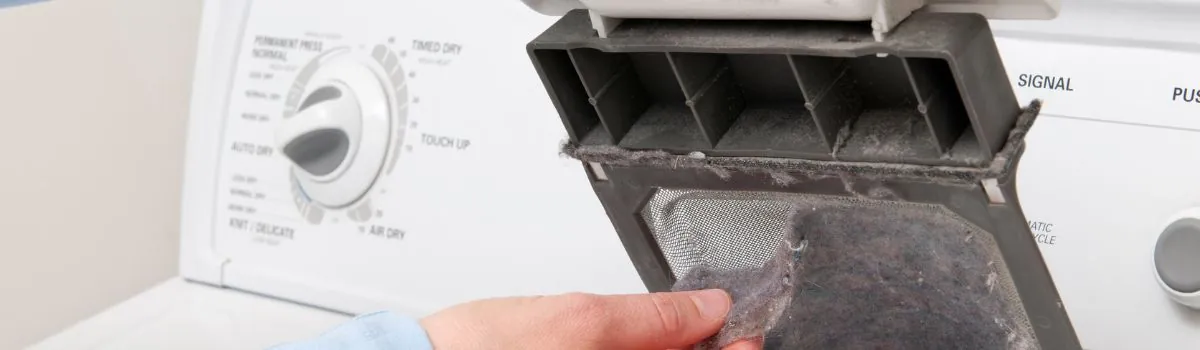
- Timed dry runs for a fixed number of minutes you choose; it ignores how wet the load actually is and keeps heating until the clock hits zero.
- Automatic dry (also called sensor dry, moisture sensing, or auto dry) reads the dampness of the clothes and shuts off early when they hit the dryness level you selected.
- Automatic dry typically uses less energy because it stops when the load is done instead of running the full timer, but only if the moisture sensors are clean.
- Use timed dry for small loads, damp-dry needs, air fluff, and stubborn items that sensors misread; use automatic dry for the everyday mixed load.
- A dirty or fabric-softener-coated moisture sensor bar is the number one reason automatic dry quits working or leaves clothes damp.
- The two metal strips inside the drum door area aren’t a gimmick — they’re the sensor, and wiping them with rubbing alcohol restores accuracy.
What Automatic Dry Actually Does
Automatic dry goes by several names depending on the brand. Whirlpool and Maytag call it Auto Dry or Sensor Dry. LG labels it Sensor Dry or TurboDry on some models. Samsung uses Sensor Dry and Multi-Steam. Electrolux and Frigidaire call it Auto Dry or Perfect Dry. GE uses Sensor Dry and eDry. Underneath the marketing names, the mechanism is the same on almost every residential dryer sold in the US.
Inside the drum, usually near the front lip or on a baffle, you’ll find two bare metal strips separated by a small gap. These strips are the moisture sensor. When wet fabric touches both strips at once, a tiny electrical current flows between them.
Wet clothes conduct electricity; dry clothes do not. The control board counts how often that current flows and how long it takes to stop flowing. When the strips stay dry for a set period, the board decides the load is done and shuts the cycle off.
How the Sensor Reads Your Load
The sensor doesn’t weigh your clothes or measure the air. It only knows whether the fabric touching the bars is conductive. That means it samples the load many times per minute and watches for a pattern. Early in the cycle, the bars stay wet almost constantly. As the load dries, the wet-contact time drops. When the sensor sees the bars dry for a continuous stretch — often a minute or two, depending on the model — it ends the cycle.
This is why a single stray sock stuck to the sensor bar can confuse the machine, and why a load of heavy denim takes longer than a load of pillowcases even on the same setting.
What the Dryness Levels Mean
Most automatic dry cycles offer three or four dryness levels. They aren’t temperature settings — they change how long the sensor waits before declaring the load done.
| Dryness Level | Typical Label | Best For | What It Does |
|---|---|---|---|
| Less Dry | Damp Dry, Iron Dry | Items you’ll iron or hang | Stops while fabric still feels cool and slightly damp |
| Normal Dry | Medium, Normal | Everyday mixed loads | Standard endpoint for most clothing |
| More Dry | Very Dry, Extra Dry | Towels, bedding, heavy cotton | Runs longer to drive out residual moisture |
| Sanitize / Antibacterial | Sanitize | Bedding, illness in the house | High heat for an extended period, not sensor-driven on many models |
What Timed Dry Actually Does
Timed dry is the simplest setting on the machine. You turn the dial or press the button to a number of minutes — usually anywhere from 20 to 90 — and the dryer runs its heater and tumbler for exactly that long, then stops. The sensor plays no role. A timed dry cycle will happily run for 60 minutes on a load that was already dry after 25.
This sounds wasteful, and often it is. But timed dry exists for good reasons. It gives you total control when the sensor can’t be trusted: a single heavy blanket, a load of rubber-backed bath mats, a down jacket, or anything with a fabric type the sensor reads poorly.
When the Timer Is the Right Tool
Timed dry shines in specific situations:
- Air fluff or no-heat tumble for freshening clothes, dusting off pet hair, or fluffing pillows — the timer is the only control that matters.
- Damp dry for items you plan to iron, where you want them slightly wet and the sensor might overshoot.
- Small loads of two or three items, where the sensor may not get consistent contact and shuts off too early or too late.
- Bulky items like comforters and sleeping bags that ball up and leave the sensor bars exposed to dry air while the center stays soaked.
- Wet items added mid-cycle when you just want a fixed extra 15 minutes.
Automatic Dry vs Timed Dry: Side-by-Side
Here is the comparison most people are looking for, laid out plainly.
| Feature | Automatic Dry | Timed Dry |
|---|---|---|
| Control method | Moisture sensor bars | Mechanical or electronic timer |
| Stops when | Load reaches selected dryness | Set minutes elapse |
| Energy use | Lower on most loads | Higher, especially on partial loads |
| Best for | Everyday mixed loads | Bulky, small, or special items |
| Risk of overdrying | Low if sensors are clean | High if you guess wrong |
| Risk of underdrying | Moderate if sensors are dirty | Low if you set enough time |
| User effort | Pick a level, walk away | Estimate minutes, check back |
| Works with wet items added late | Yes, within limits | Yes, but you must add time |
The honest verdict: automatic dry wins for routine laundry, timed dry wins for the oddball loads. Most households should live in automatic dry and reach for the timer only when the sensor is clearly struggling.
Which Mode Saves More Energy?
Automatic dry generally uses less energy because it stops when the load is dry rather than running a fixed clock. The US Department of Energy’s ENERGY STAR dryer program notes that sensor-equipped dryers can cut energy use compared with timed drying, since the machine avoids heating already-dry clothes. The savings depend heavily on how accurately you would have guessed the time yourself.
Think about it this way. If your typical medium load takes 42 minutes to dry but you habitually set the timer to 60 “just to be safe,” you’re heating dry clothes for 18 minutes every single load. Across a family doing eight loads a week, that’s roughly two and a half hours of pointless heating weekly. Automatic dry eliminates that guesswork.
The Catch With Dirty Sensors
The energy advantage evaporates if the sensor is coated. Fabric softener, dryer sheets, and detergent residue leave a film on the metal bars that insulates them. A filmed sensor can’t detect moisture, so the dryer either runs the full cycle anyway or shuts off early with damp clothes. Either way, you lose the benefit. Cleaning the bars monthly with a cotton ball and rubbing alcohol keeps automatic dry honest.
How to Choose the Right Setting
Choosing comes down to three questions: how big is the load, how uniform is the fabric, and how precise does the endpoint need to be?
Match the Setting to the Load
Use this quick decision guide:
- Full mixed load of shirts, pants, socks → Automatic dry, Normal.
- Towels and washcloths → Automatic dry, More Dry.
- Bed sheets and pillowcases → Automatic dry, Normal or More Dry.
- One heavy comforter → Timed dry, 50–70 minutes, checking halfway.
- Two or three items → Timed dry, 20–30 minutes.
- Down jacket or sleeping bag → Timed dry on low, in segments, with dryer balls.
- Clothes to be ironed → Automatic dry, Less Dry, or timed dry 15–20 minutes.
- Pet hair removal or freshening → Timed dry, Air Fluff, 10–15 minutes.
Set Temperature Separately
On most dryers, dryness level and temperature are two different controls. Don’t confuse them. A load of synthetics on Automatic Dry / Normal can still be scorched if you also chose High heat. Match heat to fabric: Low for delicates and synthetics, Medium for permanent press, High for towels and heavy cotton.
Common Problems and Fixes
Most automatic dry complaints trace back to a handful of causes. Here is how to troubleshoot each.
Clothes Still Damp After Automatic Dry
This is the most common gripe. Run through these checks in order:
- Clean the sensor bars. Wipe with rubbing alcohol and a soft cloth. Let them dry before running a load.
- Check the dryness level. If it’s set to Less Dry, the machine is doing exactly what you asked.
- Reduce load size. An overloaded drum can’t tumble freely, so wet spots never touch the sensor.
- Check the vent. A clogged lint screen or crushed exhaust duct traps humid air and slows drying dramatically. Clean the lint filter every load and inspect the duct yearly.
- Confirm the sensor is being touched. Very small loads may never contact the bars. Switch to timed dry for those.
Dryer Shuts Off Too Early
If the cycle ends while clothes are clearly wet, the sensor may be reading a dry patch. Separate the load before starting, avoid balling items together, and make sure nothing is stuck against the sensor. On some models, a faulty sensor or a loose wire behind the drum causes this, and a technician visit is the fix.
Timed Dry Runs Too Long or Short
Timed dry problems are usually mechanical. A worn timer on an older dryer may not advance correctly, and electronic control boards can fail. If the timer won’t move or the machine ignores the dial entirely, that’s a control issue, not a user error.
Warning: Never run a dryer with a damaged or missing lint filter. Lint buildup near the heating element is a leading cause of dryer fires, and the US Consumer Product Safety Commission reports thousands of dryer fires each year, most from failure to clean. Clean the filter before every load.
Getting the Most From Automatic Dry
A few habits make automatic dry dramatically more reliable.
- Shake out each item before loading so fabric isn’t balled up and the sensor gets even contact.
- Don’t overload. Fill the drum roughly two-thirds full for best tumbling and sensor accuracy.
- Sort by weight, not just color. Heavy towels and light shirts dry at different rates and confuse the sensor in the same load.
- Clean the sensor bars monthly with rubbing alcohol — more often if you use dryer sheets.
- Skip dryer sheets occasionally or switch to wool dryer balls, which don’t leave the waxy film that coats sensors.
- Empty the lint filter every load and wash it with soap and water every few months if you use softener.
Pro Tip: If your dryer has a “Sensor Dry” and a separate “Timed Dry” button, the machine defaults to whichever you pressed last. Check the display before walking away on a new load, or you may run a 60-minute timer on a light load of delicates.
When Timed Dry Is Genuinely Better
Automatic dry isn’t always the answer, and pretending otherwise leads to damp comforters and frustrated laundry days. Reach for timed dry when:
- The load is one or two bulky items that won’t tumble evenly.
- You’re running Air Fluff or No Heat for freshening.
- You added a wet item to an already-running or finished load.
- You need damp-dry results for ironing or hanging.
- The load is tiny — a couple of workout shirts or a single uniform.
- Your sensor is known to be faulty and you’re waiting on a repair.
Automatic Dry on Different Brands
Brand naming varies, which trips people up when they switch machines. Here is a rough translation.
| Brand | Automatic Dry Name | Timed Dry Name | Notes |
|---|---|---|---|
| Whirlpool | Auto Dry / Sensor Dry | Timed Dry | Sensor bars near lint filter |
| Maytag | Auto Dry / Sensor Dry | Timed Dry | Similar layout to Whirlpool |
| LG | Sensor Dry | Manual Dry / Timed Dry | Some models add TurboDry |
| Samsung | Sensor Dry | Timed Dry | Multi-Steam on higher models |
| GE | Sensor Dry / eDry | Timed Dry | eDry reduces heat on some cycles |
| Electrolux / Frigidaire | Auto Dry / Perfect Dry | Timed Dry | Sensor in drum front |
| Speed Queen | Sensor Dry | Time Dry | Commercial-style controls |
The controls may look different, but the logic is identical across all of them: sensor versus clock.
Maintenance That Keeps Both Modes Working
Whether you rely on automatic or timed dry, the machine needs basic care to perform.
- Lint filter: clean before every load.
- Sensor bars: wipe monthly with rubbing alcohol.
- Exhaust vent: inspect and clean annually; a professional duct cleaning every few years is worth it.
- Drum: wipe occasionally with a damp cloth to remove softener film.
- Leveling: make sure the dryer sits level so loads tumble evenly and sensors get consistent contact.
Pro Tip: If you use liquid fabric softener in the washer, cut back. It coats both the washer drum and the dryer sensor, and it’s the single biggest cause of automatic dry cycles that stop early or run long.
Frequently Asked Questions
Is automatic dry better than timed dry?
For everyday mixed loads, yes. Automatic dry stops when the clothes are actually dry, which saves energy and prevents overdrying. Timed dry is better for bulky items, tiny loads, air fluff, and damp-dry needs where the sensor can’t read accurately. Most households should use automatic dry as the default and timed dry as the exception.
Why does my dryer’s automatic dry leave clothes damp?
The usual culprit is a dirty moisture sensor. Fabric softener and dryer sheets leave a film on the metal bars, so they can’t detect wet fabric and the cycle ends early. Wipe the bars with rubbing alcohol, reduce load size, and check that your vent and lint filter are clear. If the problem continues, the sensor itself may be faulty.
Does timed dry use more electricity?
Usually, yes. Timed dry runs for the full number of minutes you set regardless of how dry the load is, so it often heats clothes that are already done. Automatic dry shuts off when the sensor detects dryness, which typically shortens the cycle. The gap widens the more you tend to overestimate your timer settings.
Can I use timed dry for everything?
You can, but you’ll spend more energy and risk overdrying. Timed dry works fine if you know your loads well and set accurate minutes, but it requires more attention and guessing. Automatic dry removes that guesswork for routine loads and is the better default for most people.
How do I know if my dryer has a moisture sensor?
Open the door and look inside the drum near the front lip or on a baffle. You’ll see two or three bare metal strips separated by small gaps. If your control panel has a “Sensor Dry,” “Auto Dry,” or “Moisture Sensing” option, the machine has a sensor. Dryers with only a timer dial and no auto setting do not.
What is the difference between sensor dry and auto dry?
Nothing functional. They’re two names for the same feature. Whirlpool and Maytag tend to say Auto Dry, while LG, Samsung, and GE tend to say Sensor Dry. Both use metal moisture bars inside the drum to detect when the load is dry and end the cycle automatically.
Conclusion
Your next step is simple: open your dryer door, find the two metal sensor bars, and wipe them with rubbing alcohol before your next load. Then run that load on automatic dry at the Normal setting and see how it compares to your usual timed cycle. Most people never go back.