
There’s usually no reset button on a Kenmore freezer. Most models can be power-cycled by unplugging the unit for a few minutes, then plugging it back in.
If your freezer has a red or black button near the compressor, that’s the defrost timer or a manual overload switch, not a reset. Pressing it won’t clear a fault code.
Unplugging only helps when the control board or display is locked up. If it’s completely dead, check the outlet and the breaker first.
On most chest freezers, the cord is behind a panel at the lower back. Pull the freezer out far enough to reach it rather than yanking the cord.
Check your model number first.
Quick answer for Kenmore freezer reset
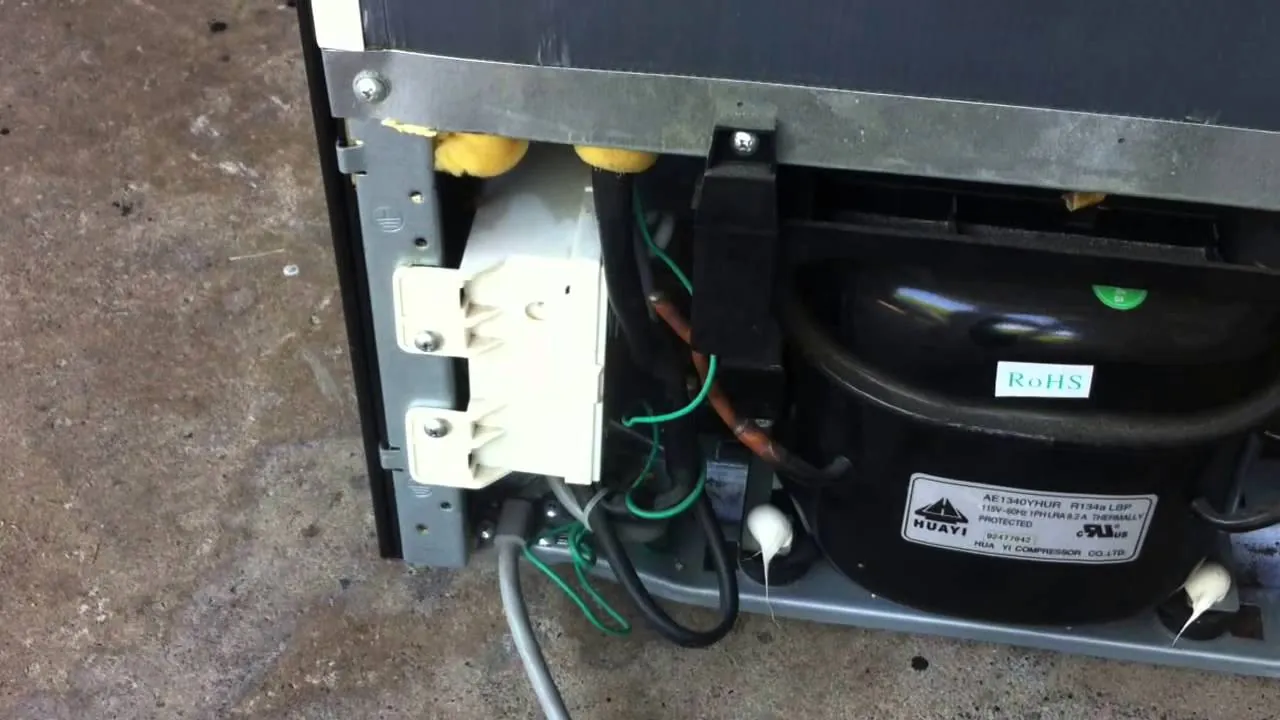
- Most Kenmore freezers have no reset button — you reset by cutting power for 30 minutes.
- A small red button near the compressor is the overload protector. It resets itself.
- A dial or knob on the back panel is the defrost timer. Turn it with a flat screwdriver to force a cycle.
- If the freezer won’t cool after a power cut, check the outlet and breaker, then call a technician.
- Frost-free models have a defrost heater that can trip a safety cut-out. Only a technician can reset that one.
- The model and serial plate is inside the freezer, on the left wall or behind the crisper. Read it before you call anyone.
Why there’s no reset button on most Kenmore freezers
A freezer isn’t built like a microwave or a garbage disposal. There’s no single switch that pops and stops everything. Instead, the unit runs on a thermostat, a compressor, and a defrost timer working together. When one of them trips, the freezer just stops cooling. It doesn’t announce itself with a button you can press.
The part people mistake for a reset button is the overload protector. It sits on the compressor and cuts power when the compressor gets too hot or draws too much current. It’s a small red or black disc. It resets on its own once the compressor cools down, usually within a few minutes. Pushing it does nothing, and pressing it hard can break the tab.
The second part people mistake for a reset is the defrost timer. On older Kenmore models it’s a small box behind the kick plate or on the back. It has a slot you can turn with a screwdriver. Turning it starts a defrost cycle. That’s not a reset, but it can clear a stuck defrost mode that’s keeping the freezer warm.
Kenmore freezers are made by several different companies under contract, so parts vary by model and year. Whirlpool, Frigidaire, and LG have all built Kenmore units at different times. That’s why the layout inside your freezer may not match a photo you find online. The model number on the inner plate is the only reliable guide. You can look it up on the Kenmore product support page to see the exact parts diagram for your unit.
When a power cycle isn’t the right fix
A power cycle fixes a frozen control board or a tripped internal cut-out. It does nothing for a failed compressor, a blocked capillary tube, or a dead thermostat. Here’s how to tell the difference.
| Situation | What changes | What to do instead |
|---|---|---|
| Freezer hums but won’t cool | Compressor running, no cold | Check door seal and vents |
| No sound at all | No power reaching unit | Test the outlet and breaker |
| Cools, then warms every 8 hours | Defrost cycle stuck on | Turn the defrost timer |
| Frost only on the back wall | Defrost heater failed | Call a technician |
| Red button pops within minutes | Compressor overload tripping | Stop resetting, call a tech |
| Freezer is 5 years or older | Sealed system wear | Get a repair quote first |
If the freezer is old and the compressor has failed, the repair often costs more than a new unit. Get a written quote before you agree to anything.
How to reset a Kenmore freezer safely
You can do all of these steps yourself. None of them involve opening the compressor housing or touching any wiring. A capacitor inside that housing can hold a lethal charge even when the freezer is unplugged, so leave anything behind the back panel to a qualified technician.
-
Unplug the freezer from the wall. Pull the plug, don’t just flip the breaker. Wait a full 30 minutes. This clears a locked-up control board state. Plug it back in and listen for the compressor to start within 5 minutes.
-
Check the outlet and breaker. Plug a lamp into the same outlet. If the lamp works, the outlet is fine. If it doesn’t, reset the breaker or replace the outlet. A freezer on a shared circuit can trip when another appliance kicks on.
-
Find the defrost timer. On most Kenmore models it’s behind the kick plate at the bottom front, or on the back near the compressor. It’s a small box with a slotted dial. Turn the slot clockwise with a flat screwdriver until you hear a click.
-
Wait 30 minutes after turning the timer. The freezer should enter defrost mode, then return to cooling. If it stays warm for more than 2 hours, the timer or heater has failed. That’s a technician job.
Check the door gasket. Close the door on a dollar bill. If you can pull the bill out with no drag, the seal is worn. A bad gasket makes the freezer run constantly and can trip the overload. A replacement gasket is inexpensive compared with the alternative and clips on in minutes.
-
Clear the vents inside. Leave 1 inch of space between food and the back wall. Blocked vents make the thermostat read wrong. The freezer then runs too long and warms up in cycles.
-
Set the temperature dial to the middle setting. On most Kenmore freezers that’s “4” or “C”. Wait 24 hours before you check again. Freezers don’t recover in an hour.
-
Write down what you did and when. If you end up calling a technician, this log saves time. Note the model number, the date, and what the freezer did after each step.
Mistakes that make a freezer worse

-
Pressing the overload button hard. It’s not a reset switch. Forcing it can crack the housing and let moisture into the compressor terminals. That turns a minor repair into a much more expensive one.
-
Unplugging for only a few seconds. The control board needs a few minutes without power to reset. Shorter waits often leave the fault in place, and you’ll think the reset failed when it didn’t.
-
Loading the freezer with warm food right after a reset. Warm food raises the internal temperature for hours. The compressor runs non-stop and can trip the overload again. Wait until the freezer holds 0°F before you add anything.
-
Ignoring a freezer that’s cold but frosting up. Frost on the back wall means the defrost system is failing. Left alone, the ice builds until airflow stops and the whole unit warms. Fix it while it’s still cold.
-
Calling a technician before checking the breaker. A tripped breaker or a dead outlet looks exactly like a failed compressor. It’s the cheapest thing to rule out and the most common cause of a “dead” freezer.
Frequently asked questions
Does a Kenmore freezer have a reset button?
No. Almost no Kenmore freezer has a reset button. The reset is a power cycle: unplug the unit for 30 minutes, then plug it back in. The only button you might see is the compressor overload protector, which resets itself and shouldn’t be pressed. If your model has a defrost timer, turning its slot forces a cycle but isn’t a true reset.
Where is the reset button on a Kenmore chest freezer?
There isn’t one on standard chest models. What looks like a button near the compressor is the overload protector, which resets on its own in 20 to 40 minutes. On some chest freezers, a power indicator light sits on the front corner, but it’s just a light. Your reset is the plug.
How long do I unplug a Kenmore freezer to reset it?
Unplug it for a few minutes. This is enough time for most control boards to clear a locked state. After plugging back in, give the freezer 24 hours to reach 0°F before you judge whether the reset worked.
Why does my Kenmore freezer keep tripping the overload?
The overload trips when the compressor runs too hot or draws too much current. Common causes are a dirty condenser coil, a failing start relay, or low refrigerant from a slow leak. If it trips within minutes of every restart, stop resetting it. Repeated trips can destroy the compressor, and that’s a technician repair.
Is it safe to reset a freezer myself?
Yes, as long as you stay outside the back panel. Unplugging, checking the outlet, turning the defrost timer, and cleaning the coils are all safe for a homeowner. Never open the compressor housing or touch the capacitor, the wiring, or the sealed system. A capacitor can hold a lethal charge even after the freezer is unplugged.
What temperature should a Kenmore freezer be?
Set it to 0°F (-18°C). This is the standard for safe long-term food storage, and it’s the setting the USDA recommends for freezers. A chest freezer on “4” or a dial between “C” and “5” usually lands near 0°F. Check with a fridge thermometer after 24 hours and adjust one notch at a time.
Can a Kenmore freezer reset itself?
Yes, in two ways. The overload protector resets itself once the compressor cools, usually in 20 to 40 minutes. The defrost timer also runs on its own cycle, typically every 8 to 12 hours of compressor run time. If your freezer recovers on its own after a warm spell, one of these two cycles is probably what fixed it.
What if my freezer still won’t cool after a reset?
If it’s still warm 24 hours after a 30-minute power cycle, the fault isn’t something a reset can fix. Likely causes are a failed compressor, a blocked capillary tube, a dead thermostat, or a refrigerant leak. Call a technician and have your model number ready.